nemi Motion
Description
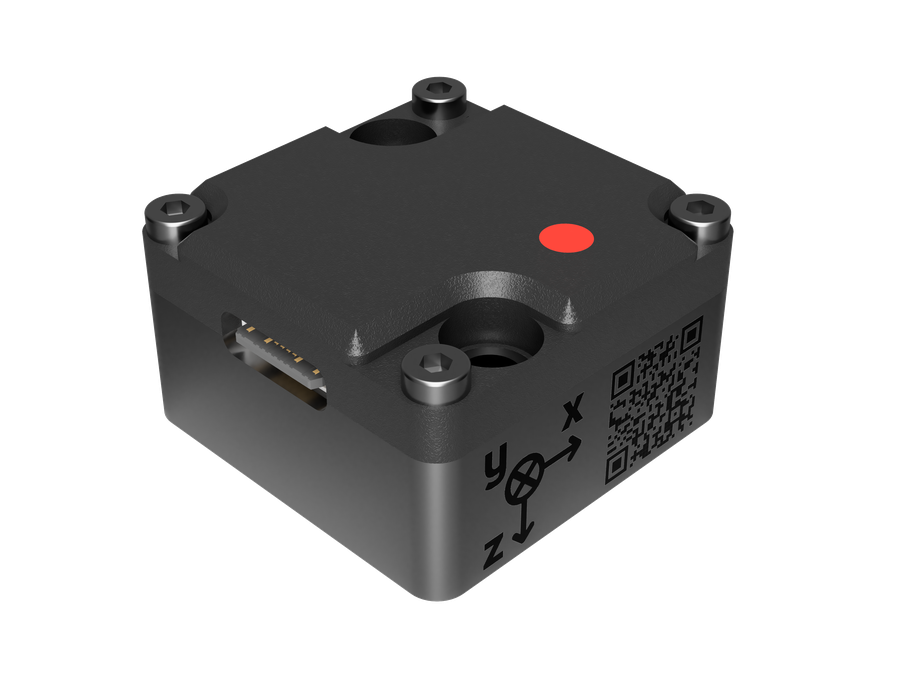
nemi Motion is a miniaturized, ruggedized and sealed wireless acceleration and rotation rate sensor (wireless IMU) for highly dynamic measurement tasks. With its 3-axis accelerometer, 3-axis gyroscope and 3-axis magnetometer plus temperature sensor, it is a wireless inertial measurement unit with 9 degrees of freedom — at 25 × 25 × 14.5 mm and approx. 18 g almost as small as very small cabled piezo accelerometers.
The accelerometer covers measuring ranges from ±2 g up to ±256 g, the gyroscope up to ±4,000 °/s. All acceleration and rotation rate axes are sampled simultaneously at up to 4 kHz, covering static and dynamic signals from 0 to approx. 1,500 Hz. The housing is rated IP67; an internal rechargeable battery provides more than 10 hours of runtime at the highest sampling rate and is charged via USB-C.
nemi Motion transmits its data via the nemi Link 2400 radio network with µs-precise time synchronization and buffered transmission. It is compatible with all nemi Link 2400 receivers: nemi Connect (USB receiver for PC or Gantner Q.Station), nemi Log (compact SD logger with cellular option) and nemi EdgeBase (autonomous field gateway). nemi Motion is the ideal entry into the nemi Link 2400 portfolio.
Typical Applications
- Test benches, prototype tests and measurements on small and lightweight components — the low mass influences the measured object only minimally.
- Measurements on moving or rotating components — e.g. torsional vibrations on shafts (tangential acceleration or gyroscope).
- Rotation angles and rotation rates via sensor fusion — e.g. on rotating shafts.
- Vibration and acceleration measurements in highly dynamic applications up to ±256 g, e.g. shocks and impacts.
Wireless data transmission and simple screw mounting enable particularly fast and flexible measurement setups.
Technical Specifications
General
| Parameter | Value | Unit |
|---|---|---|
| Dimensions | 25 × 25 × 14.5 | mm |
| Weight | approx. 18 (with aluminum bottom) | g |
| Housing protection class | IP67 | — |
| Operating temperature | −20 to 60 | °C |
| Onboard MCU, usable for edge computing | 64 MHz 32-bit MCU, 1 MB Flash, 256 KB RAM, hardware crypto features | — |
| Operating element | Push button: switch on / off (press > 3 s) | — |
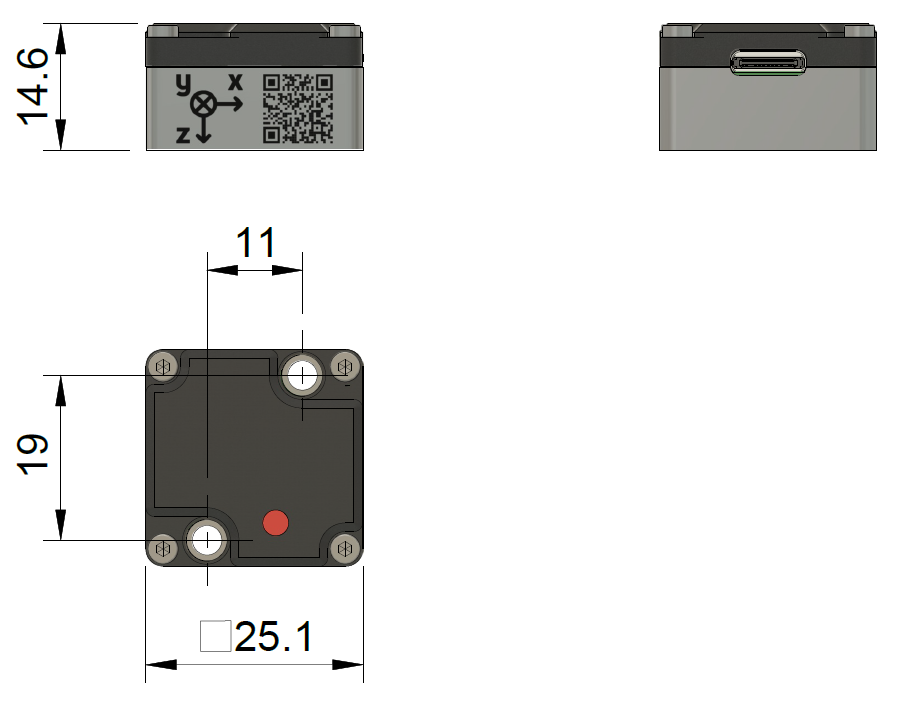
(All dimensions in mm)
Power Supply
| Parameter | Value | Unit |
|---|---|---|
| Internal power supply | Rechargeable battery, 95 mAh | — |
| Runtime at 4,000 Hz (all six ACC/GYR axes active) | > 10 | h |
| Runtime at reduced configuration | several weeks possible (lower sampling rate, intermittent operation, sleep mode) | — |
| Charging time (0–100 %) | approx. 2 | h |
| External power supply / charging | 5 V via USB-C; external battery packs via USB-C possible (on request) | V |
IMU: 3-axis Accelerometer (ACC) and 3-axis Gyroscope (GYR)
| Parameter | Value | Unit |
|---|---|---|
| Selectable sampling rates | 4,000 / 2,000 / 1,000 / 500 / 250 / 125 | Hz |
| ACC selectable measuring ranges | ± 2 / 4 / 8 / 16 / 32 / 64 / 128 / 256 | g |
| GYR selectable measuring ranges | ± 4,000 / 2,000 / 1,000 / 500 / 250 / 125 | °/s |
| Signal bandwidth (−3 dB) at 4,000 Hz — ACC, ranges ±2 to 16 g | 600 | Hz |
| Signal bandwidth (−3 dB) at 4,000 Hz — ACC, ranges ±32 to 256 g | 1,500 | Hz |
| Signal bandwidth (−3 dB) at 4,000 Hz — GYR | 528 | Hz |
| Signal resolution | 16 | bit |
| Static inaccuracy ACC without calibration | 8 | % |
| Static inaccuracy ACC with 3D calibration (on request) | < 0.1 (low-g path ≤ 16 g) / < 1 (high-g path ≥ 32 g) | % |
| Angle resolution with sensor fusion (dynamic applications) | approx. 0.1 | ° |
Magnetometer (MAG)
| Parameter | Value | Unit |
|---|---|---|
| Sampling rate | 1/8 of ACC/GYR sampling rate | Hz |
| Measuring ranges | ± 16 / 12 / 8 / 4 | Gauss |
| Signal resolution | 16 | bit |
Internal Temperature Sensor
| Parameter | Value | Unit |
|---|---|---|
| Sampling rate | 1/16 of ACC/GYR sampling rate | Hz |
| Measuring range | Full operating temperature range | °C |
| Resolution | 0.1 | °C |
Radio (nemi Link 2400)
| Parameter | Value |
|---|---|
| Frequency band | 2.4 GHz |
| Topology | Star (one receiver per channel) |
| Max. sensor nodes per channel | 8 |
| Range | up to 350 m (depending on radio mode and environment) |
| Compatible receivers | nemi Connect, nemi Log, nemi EdgeBase |
First Commissioning
Required Hardware and Software
| Item | Purpose |
|---|---|
| nemi Motion sensor | Sensor node |
| nemi Connect / nemi EdgeBase / nemi Log | Receiver |
| USB-C cable (data-capable) | Charging and USB configuration |
| nemi Sensor Config v2.1 or later | Radio configuration via USB |
| nemi Studio (included with all products at no extra charge) or nemi Studio Web App | Configuration of sensors and channels, live data display, CSV recording, FFT, rotation angles and rates via sensor fusion |
Step 1 — Charge the Sensor
Connect the sensor via USB-C to a PC or USB charger. The solid red LED indicates charging; when the red LED is no longer continuously lit, the battery is full. A full charge takes approx. 2 hours.
Switching On and Off
nemi Motion has a push button. Press the button for longer than 3 seconds to switch the sensor on; press it again for longer than 3 seconds to switch it off. Apart from this, operation (USB configuration, LED codes, receiver setup) is the same as for the nemi G+.
Step 2 — Configure the Radio Parameters via USB
The LED codes of nemi Motion follow the same USB configuration scheme as the other nemi Link 2400 sensor nodes: after a restart the sensor waits for a virtual COM port (solid green + flashing yellow), and once the port is opened it waits for new RF parameters (solid green + flashing blue). Write the radio parameters (channel, radio mode, node number, maximum nodes) with nemi Sensor Config as described for the nemi G+.
Recommended first-test radio settings:
| Parameter | Recommended value | Notes |
|---|---|---|
| nemi Link 2400 Mode | 2 Mbit/s | Highest throughput for high sampling rates; adequate range for bench tests |
| nemi Link 2400 Node Count | 1 or 3 | Up to 8 nodes possible, but the max. sampling rate is reduced |
| nemi Link 2400 Channel | 0 (other preferred channels: 25, 50, 75) | Avoids busy Wi-Fi subbands |
| nemi Link 2400 Node Number | 1 | Unique per sensor on the same channel |
Step 3 — Set Up the Receiver and Verify Data
With nemi Connect:
- Launch nemi Studio (or open the nemi Studio Web App in Chrome/Edge).
- Plug in the nemi Connect, click Connect COM-Port and select the same radio data rate, node count and channel as the sensor.
- Click Start Receiver and switch on the nemi Motion (press the button > 3 s) or wake it up. Live data should appear within a few seconds.
- Check signal strength, latency and the live sampling rate. Set sampling rate and measuring ranges and send them to the node.
- Record a short CSV file to verify the data before mounting the sensor at its final location.
With nemi Log or nemi EdgeBase: configure the receiver via its configuration files; the sensor pairs automatically when channel and radio mode match.
Before finalizing an installation, verify with the nemi Link 2400 Radio Channel Calculator that the planned combination of sensors, sampling rates, channel and radio mode fits within the channel bandwidth. Do not hold the sensor in your hand during range tests — human body tissue strongly absorbs 2.4 GHz signals.
LED Status Codes
| LED pattern | Meaning |
|---|---|
| Rapid flash: white → green → red → blue | Sensor restart |
| Solid red | Battery charging via USB |
| Red no longer continuously lit | Battery fully charged |
| Solid green + flashing yellow | USB data connection detected; waiting for COM port to open |
| Solid green + flashing blue | COM port open; waiting for RF parameters or settings |
| Short red flashes (~2 s) | Actively sampling and transmitting measurement data |
| Short green flashes every 10 s | Sleep mode |
| Short blue flashes (~1 s) | Time synchronization with wireless network |
| Green LED on temporarily or continuously (in wireless mode) | Internal ring buffer 80 % full — data cannot be transmitted fast enough; risk of data loss |
Range Considerations
| Radio mode | Typical range (in buildings – in urban environment) |
|---|---|
| 2 Mbit/s | 20–50 m |
| 1 Mbit/s | 50–125 m |
| 500 kbit/s | 90–225 m |
| 125 kbit/s | 140–350 m |
Range is strongly affected by metal shielding, body absorption and obstructions. Validate the range at the intended installation position. See nemi Link 2400 for details.
Mounting & Connections
Mechanical Mounting
nemi Motion is best screwed on using the two through holes in the housing (hole spacing see dimension drawing). It can also be fastened magnetically, clamped or glued. The best vibration transmission is achieved with a screw connection.
| Method | Suitability | Notes |
|---|---|---|
| Screw connection | Best vibration transmission | Preferred for dynamic measurements and frequency analysis |
| Adhesive | Practical for smooth surfaces | Use a rigid adhesive layer |
| Clamping | Temporary installations | Ensure a stiff, play-free clamping |
| Magnet | Fast temporary mounting on ferromagnetic surfaces | Affects the integrated magnetometer; do not use when heading/yaw data is required |
Mounting material (e.g. adhesive, mounting plates, magnets) is not included; it is only supplied as an option if ordered.
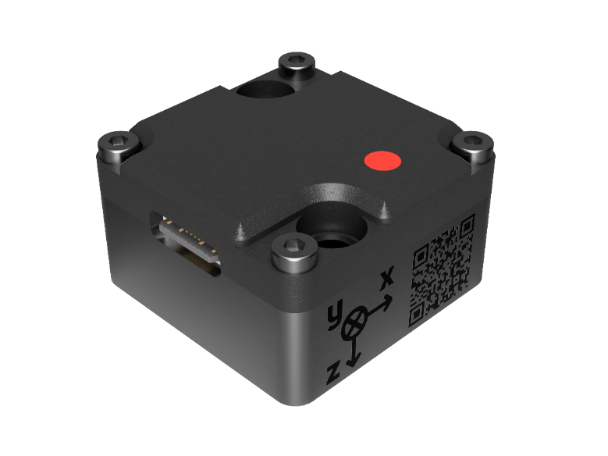
Axis orientation: The X, Y and Z axes are printed on the housing. Document and photograph the mounting orientation during installation.
Power Connections
nemi Motion is powered by its internal rechargeable battery (95 mAh) and charged via USB-C (5 V). External battery packs via USB-C are possible on request for longer runtimes.
External Sensors
nemi Motion has no external sensor interface. For external analog sensors, use the nemi DAQ product family.
Detailed Configuration
- Persistent radio settings — written via nemi Sensor Config over USB (channel, radio mode, node number, max nodes).
- Measurement settings — sent wirelessly by the receiver side: nemi Studio, nemi Studio Web App, nemi EdgeBase YAML files or nemi Log configuration CSVs (sampling rate, ACC / GYR / MAG ranges, operating mode).
Sampling Rate
The ACC and GYR axes are sampled simultaneously at the selected rate (up to 4 kHz). The magnetometer runs at 1/8 and the temperature sensor at 1/16 of the ACC/GYR sampling rate. Choose the rate from the required signal bandwidth; lower rates reduce radio load, data volume and power consumption.
Measurement Ranges
Always select the smallest range that avoids clipping.
| Sensor | Available ranges | Notes |
|---|---|---|
| Accelerometer — low-g path | ±2 / 4 / 8 / 16 g | Bandwidth 600 Hz at 4,000 Hz; < 0.1 % static inaccuracy with 3D calibration |
| Accelerometer — high-g path | ±32 / 64 / 128 / 256 g | Bandwidth 1,500 Hz at 4,000 Hz; < 1 % static inaccuracy with 3D calibration |
| Gyroscope | ±125 / 250 / 500 / 1,000 / 2,000 / 4,000 °/s | Select above the expected peak rotation rate (4,000 °/s ≈ 667 rpm) |
| Magnetometer | ±4 / 8 / 12 / 16 Gauss | Not usable with magnetic mounting |
Sensor Fusion: Attitude and Rotation Angle
With accelerometer, gyroscope and magnetometer, nemi Motion supports attitude estimation (roll, pitch, yaw) and the measurement of rotation angles and rotation rates on rotating shafts. The angle resolution with sensor fusion in dynamic applications is approx. 0.1°. nemi Studio calculates these values live (tabs Attitude and Rotation Angle) and can record them.
Power Consumption and Battery Life
The internal 95 mAh battery provides more than 10 hours at 4,000 Hz with all six ACC/GYR axes active. Lower sampling rates, intermittent operation and sleep mode extend the runtime to several weeks. Use the fastest radio mode the range allows and disable unused channels (e.g. MAG) to maximize battery life.
Time Synchronization
Within one nemi Link 2400 network, the sensor clocks are synchronized to the receiver (±10 µs with a stable radio connection); data is buffered in the sensor and retransmitted when the radio link is temporarily interrupted. The receiver handles the downstream synchronization (host PC clock for nemi Connect, NTP/GNSS for nemi EdgeBase, RTC/GNSS for nemi Log).
Integration
Our interfaces are open and documented:
- Python API for easy access to live data via nemi Connect; the complete USB data message protocol documentation is provided to customers on request.
- Recording as CSV (nemi Studio / Web App) or as i4M binary files on nemi Log (
.bin) and nemi EdgeBase (.bin.bz2); the i4M Python decoders decode them into pandas DataFrames, which can be saved as CSV, Parquet etc. or processed directly in Python. - Gantner Instruments Q.Station: direct connection of several nemi Connect via plugin.
- Autonomous operation: nemi Log (SD card, cellular MQTT/FTP) and nemi EdgeBase (SSD, VPN/FTP, MQTT) for autonomous recording, data transfer and dashboards.
| Receiver | Best for | Data access |
|---|---|---|
| nemi Connect | Test benches, live measurements with nemi Studio / nemi Studio Web App, custom USB integration | USB virtual COM port |
| nemi Log | Compact autonomous logging | .bin files, MQTT / FTP with cellular option |
| nemi EdgeBase | Long-term autonomous monitoring, edge computing | .bin.bz2 files via FTP / VPN, MQTT streams |
Data Analysis
On request, i4M supports data analysis — directly in the sensor or gateway (edge analytics, "smart data"), on the server or on the measuring computer. Data remains in the customer's IT ecosystem; alternatively nemione® cloud solutions hosted in the EU are available.
Troubleshooting
| Symptom | Likely cause | Resolution |
|---|---|---|
| No data in nemi Studio | Channel, radio mode or node number mismatch between sensor and receiver | Reconfigure the sensor via nemi Sensor Config; match channel and radio mode on both sides |
| USB connected but no COM port appears | Charge-only USB-C cable | Use a data-capable USB-C cable |
| Green LED on continuously in wireless mode | Ring buffer 80 % full — radio link cannot keep up | Improve the radio link, reduce sampling rate or node count, or switch to a faster radio mode |
| Heading / yaw implausible | Magnetic mounting or ferromagnetic parts nearby | Use screw, clamp or adhesive mounting; keep magnets and steel parts away |
| Signal clips at peaks | Range too small | Increase the ACC range (up to ±256 g) |
| Progressively increasing missing samples | Battery voltage falling | Recharge the battery |
Product Changes
Ordering Options
| Item | Description |
|---|---|
| nemi Motion | Standard product |
| Weatherproof variant (on request) | Potted (internal battery can then no longer be replaced) or with additional housing |
| 3D calibration (on request) | Static deviation of the acceleration axes < 0.1 % (low-g) / < 1.0 % (high-g) |
| External battery packs (on request) | Via USB-C |
| Battery replacement (on request) | As a service |
| Customer-specific firmware features (on request) | — |
FAQ
How do I switch nemi Motion on and off? With the push button: press it for longer than 3 seconds to switch the sensor on, and again for longer than 3 seconds to switch it off. Otherwise, nemi Motion is operated like the nemi G+.
What is the difference between nemi Motion and nemi G+? nemi Motion is a smaller (25 × 25 × 14.5 mm, 18 g), IP67-sealed 9-axis IMU with acceleration ranges up to ±256 g and simultaneous sampling of all ACC and GYR axes at up to 4 kHz. nemi G+ additionally carries a 20-bit primary MEMS accelerometer with lower noise and is the better choice for high-precision quasi-static inclination measurements.
Can nemi Motion measure rotation angles on a shaft? Yes. Rotation angles and rotation rates are calculated via sensor fusion of gyroscope and accelerometer, e.g. live in nemi Studio. Torsional vibrations can be measured via tangential acceleration or the gyroscope.
Which acceleration range should I select? The smallest range that avoids clipping. Ranges up to ±16 g use the low-g path (higher accuracy), ranges from ±32 g up to ±256 g the high-g path (higher bandwidth).
How long does the battery last? More than 10 hours at 4,000 Hz with all six ACC/GYR axes active; several weeks with lower sampling rates, intermittent operation or sleep mode. Charging takes approx. 2 hours via USB-C.
Is nemi Motion waterproof? Yes, the housing is rated IP67. A potted variant or an additional housing is available on request.
Does magnetic mounting affect the measurement? Yes, it affects the magnetometer. Use screw mounting when heading/yaw data is required.
Which software do I need? nemi Sensor Config for the radio parameters and nemi Studio or the nemi Studio Web App for live data, configuration and recording. nemi Studio is included with all products at no extra charge.